Archive for the ‘Translation’ Category

Context is everything

Monday, June 14th, 2010

I am often asked to translate a single sentence (or even a lone word). That, however, is unrealistic at best, and often impossible. The best you could do is giving a dictionary equivalent for each word and massage the grammar so it meant something. There is, however, a great chance that it won’t mean what it did before it was “translated”. Depending on the language, there is often information needed for the translation that is not in the sentence.

Every language has its own grammar and rules. When two people are communicating in that language, there are relatively few misunderstandings as both people know what the conversation is about, and understand the nuance of the words being used. However, when you are faced with just a small part of a conversation, it is often impossible to translate it accurately and naturally without extra information.

For example, in Japanese, there are two main words used to mean “father”: one indicates that it is your own father, and the other that it is not. There is, however, no other word necessary to indicate whose father when both parties to the conversation already know that fact. Also, there is no distinction between singular and plural nouns.

So, the following two sentences could result in the same Japanese.

(お父さんは犬の散歩をしている。)

His father is walking the dog.

Your father is walking the dogs.

Without asking questions and finding out whose father and how many dogs, it is impossible to correctly translate even this simple sentence.

A similar situation can arise when translating from English or Chinese into Japanese. For example, the simple sentence, “I will also go to Tokyo.” has two meanings. Without knowing whether there is another person or another place involved, it is impossible to know what the “also” refers to. In Japanese, however, the position of the “also” in the sentence makes it clear, and you therefore have two sentences.

The opposite is also a problem as both the Japanese sentences would often be translated into the same English or Chinese, leaving the reader wondering what was really being meant.

When translating, it is important to know the background, understand what information is really meant to be conveyed with the sentence, and then render it into the other language.

Translate the meaning, not the words!

Right tool for the right job

Tuesday, April 13th, 2010

The psychologist, Abraham Maslow, said that, “If the only tool you have is a hammer, you tend to see every problem as a nail.” It seems that many people who are more comfortable using MS-Excel use it for things for which it was never designed. MS-Excel is a spreadsheet application used mainly for creating lists and automating calculations. However, many people—especially engineers—seem to prefer it to more suitable applications such as its friend, MS-Word, for creating instruction manuals, quality manuals, and various other documents that would be better created with a word–processing application than a spreadsheet.

The document they create may look fine when printed and serve its initial purpose. However, it can go on to be a translator’s nightmare. When the translation is longer than the original, the translation often doesn’t fit into the same cell, and trying to resize cells or text boxes can result in a total mess, and takes much more time than the same translation would have if a more suitable application had been used to create the original.

Pages don’t flow naturally; text is often broken between various cells, meaning that it is much more difficult—or sometimes impossible—to use a CAT application to speed up the translation work.

So, the end result is frequently a less-than-perfect job that takes more time, and costs more money than it would have, and should have, if the original document had been created with an appropriate application.

Every tool has its purpose. Excel’s purpose is not writing pages and pages of text. Why do you think they named MS-Word “Word”?

Seven spices, but only one reading

Tuesday, March 23rd, 2010

In Japanese there are two (main) ways to read the number “7”. It can be read as either “nana” or “shichi” depending on the context and with which other characters it is combined. The Japanese character for seven is “七”. However, when it is put together with the character “味”, which means taste, it is only ever pronounced as “shichi”. The spicy mix of at least seven spices with red pepper as the main ingredient is written as “七味” and read “shichimi”. This is actually an abbreviation of “七味唐辛子” which is read as “shichimi togarashi”.

No Japanese person, or anybody who had spent any real time living in Japan would make the mistake of reading this as “nanami” instead of “shichimi”.

But, here in Qingdao, China, I keep seeing bottles of “七味唐辛子” with “nanami togarashi” in English on the reverse side.

Possibly a fake product, but definitely a poor translation!

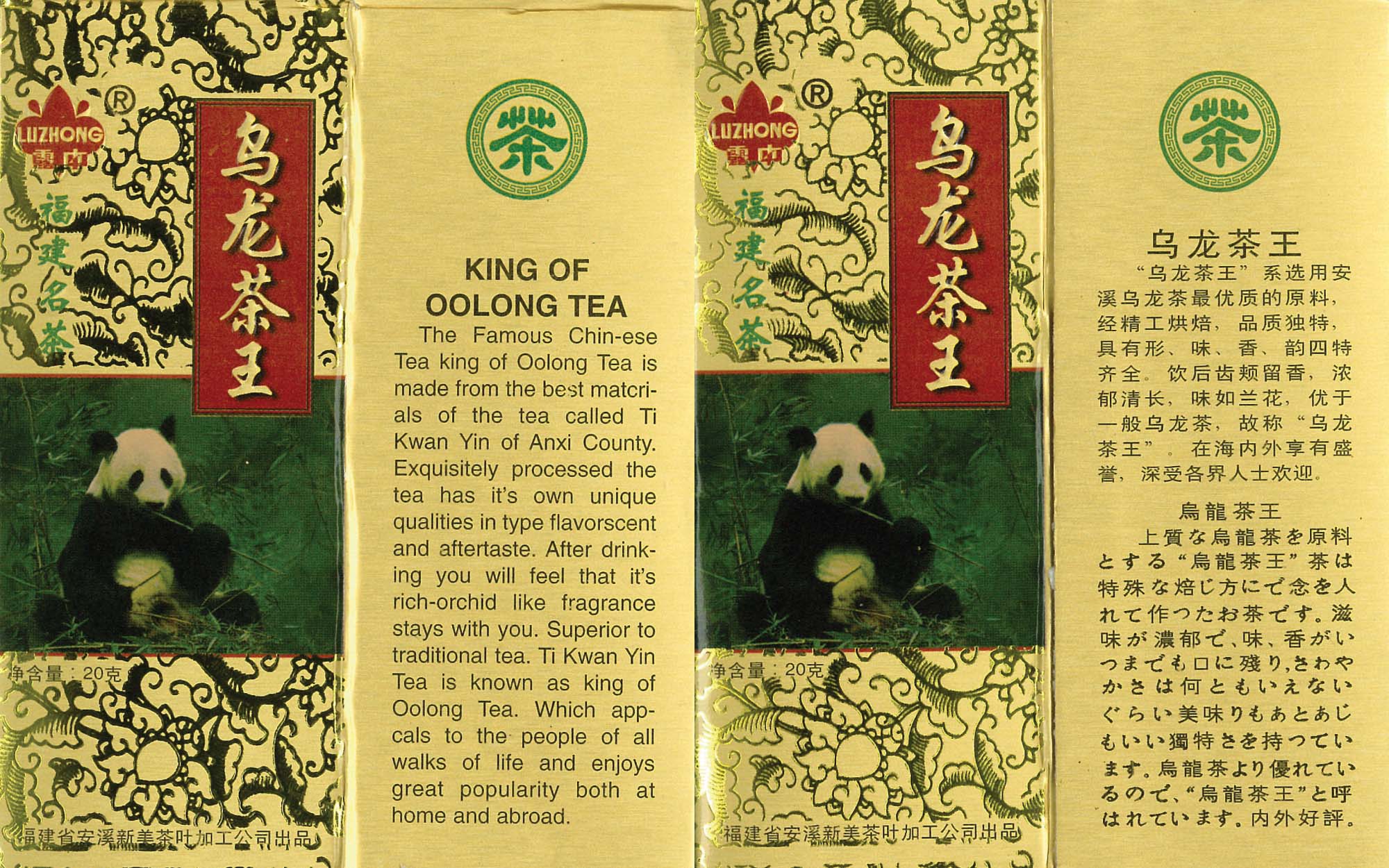
Oolong tea

Monday, March 15th, 2010

Here’s an example of what happens when you don’t hire a professional translator. You may have saved a few pennies, but that must be very little to the amount you spent on the product, printing, packaging, and distribution. Unfortunately, many people will see the translated text and use that to decide whether or not to purchase your product.

The Japanese is even worse than the English!

(Click the image to see a full-size version.)

Felix — a friendly CAT

Friday, March 12th, 2010

There are now a variety of Computer Aided Translation (CAT) applications on the market. Most have their good and bad points, but one is in a class of its own. Felix, a CAT application developed by Ginstrom IT Solutions (GITS), which is run by a professional translator based in Okinawa, has all the benefits of your computer remembering what you have translated and showing you similar translations from the past so you can improve both your speed and consistency, but without any of the headaches and steep learning curves of the other software. Add in the fact that it costs less than most of the other CAT applications—most of which fail to perform even nearly as well as Felix does—and there’s not much left to think about.

Felix works inside Microsoft’s Word, Excel, and PowerPoint, and there is even a program called TagAssist that allows you to use it in HTML files. In addition to this revolutionary simple-to-use CAT software, Ryan Ginstrom, the owner of GITS and developer of Felix, also has a number of free applications (tools) that can be downloaded from his website.

While these tools can be used with Felix to further improve your translating efficiency, many of them can be used individually just to make life easier.

Count Anything is a small program that will give you a word count from a variety of file formats. Not only do you not need to open each file, but it will even count the words in those pesky text boxes, and there is an option to ignore sections that only contain numbers.

Analyze Assist is similar to Count Anything, but it also tells you how many of your sentences are duplicated within the file or files that you use it on. Also, if you use it in combination with a Felix translation memory file (TM), it will tell you how much of your file is in the TM, and allow you to quickly estimate how much work (= time = money) will be involved in translating the file.

These tools alone speed up the process of estimating how long it will take to do a translation, and that means you are already saving time (= money!!). All this for free!

If you still have any doubts whether Felix is worth the price, just download the fully-functional trial version. There is no limit to how long you can use it, and no functions are removed in the trial version. In fact, the only limitation is that you can only use memories with up to 500 lines in them. That should be plenty to give it a test run.

Ryan even offers a money-back guarantee. To quote from his website: “Any time within 60 days of your purchase you can ask for and receive a full refund, no questions asked.”

There is plenty more information about Felix and the various tools that can be used with it, so why not go any take a look around the site while you download the latest version for free, and take the friendliest CAT application for a test drive.